
TL;DR
CMF Clip Pro is a pair of open-ear headphones priced at 990 kr. They offer a secure, highly comfortable fit, tactile physical buttons, and an innovative Smart Dial on the case for effortless control. However, bass reproduction is weak, and key features come turned off out of the box. They suit listeners prioritizing comfort, situational awareness, and easy controls.
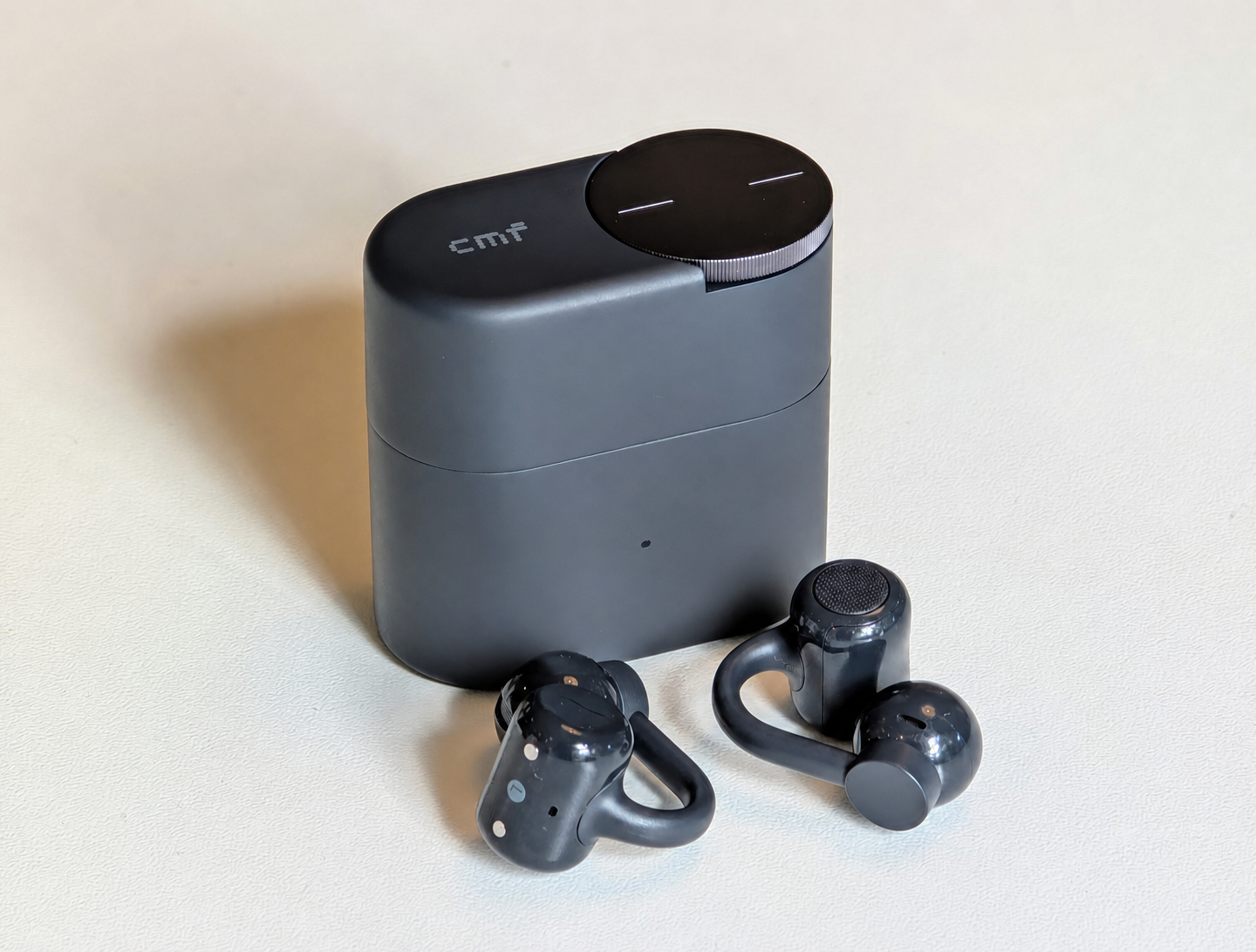
CMF is Nothing’s more affordable sister brand, and until now, they have mostly stuck to in-ear buds and watches. Now, it’s time for open-ear headphones. CMF Clip Pro is clipped onto the ear instead of being inserted into the ear canal. They feature a 10.8 mm driver, LDAC, four microphones, IP54 rating, and a battery life of 10 hours in the buds. However, the truly unusual feature isn’t found in your ear but in your pocket: the case has a large, rotatable dial that CMF calls Smart Dial, and the idea is that you should be able to control your music without touching either the buds or your phone.
The recommended price is 990 SEK, which places them right among the more affordable open-ear headphones we have tested recently. But is a fun dial enough to make a pair of open-ear headphones worth the money? Let’s find out!
Design and Fit
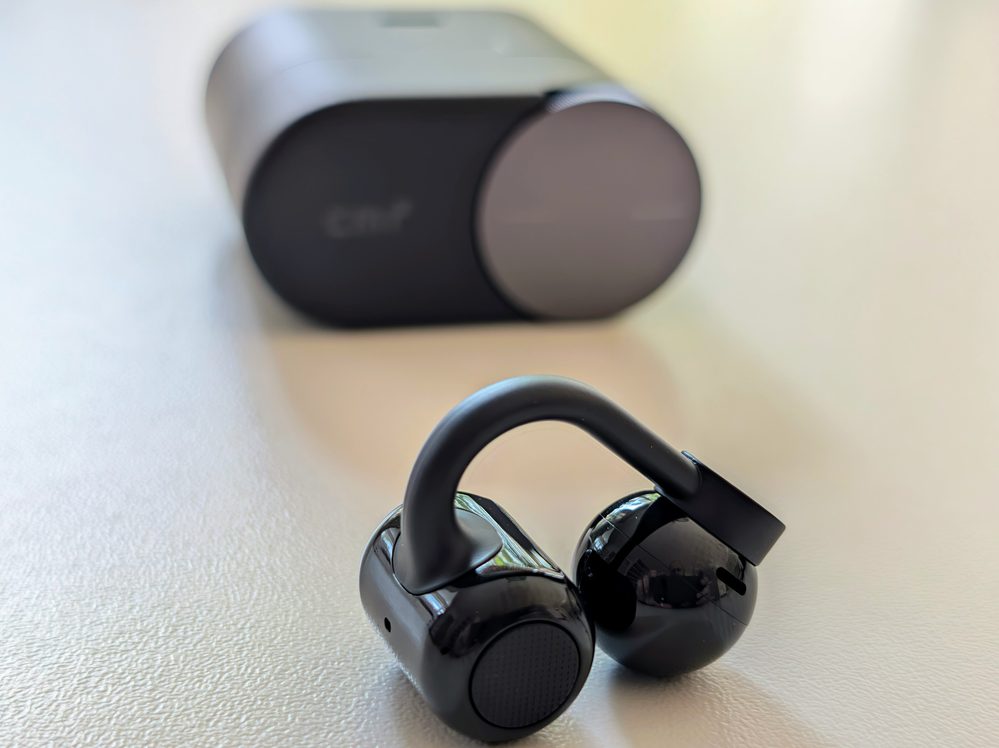
We’ll start with the fit, because it’s the best thing about these headphones. The buds are built in three parts: a small ball containing the speaker that rests just at the opening of the ear canal, a counterweight behind the ear where the battery and buttons are located, and a flexible bridge with a titanium wire core in between.
They fit really well. The clamping force is just right; they don’t move when I shake my head, and I can wear them for hours without any soreness. Glasses are no problem, as the bridge occupies the lower part of the ear while the frames rest higher up. The IP54 rating means sweat and a rain shower are fine.
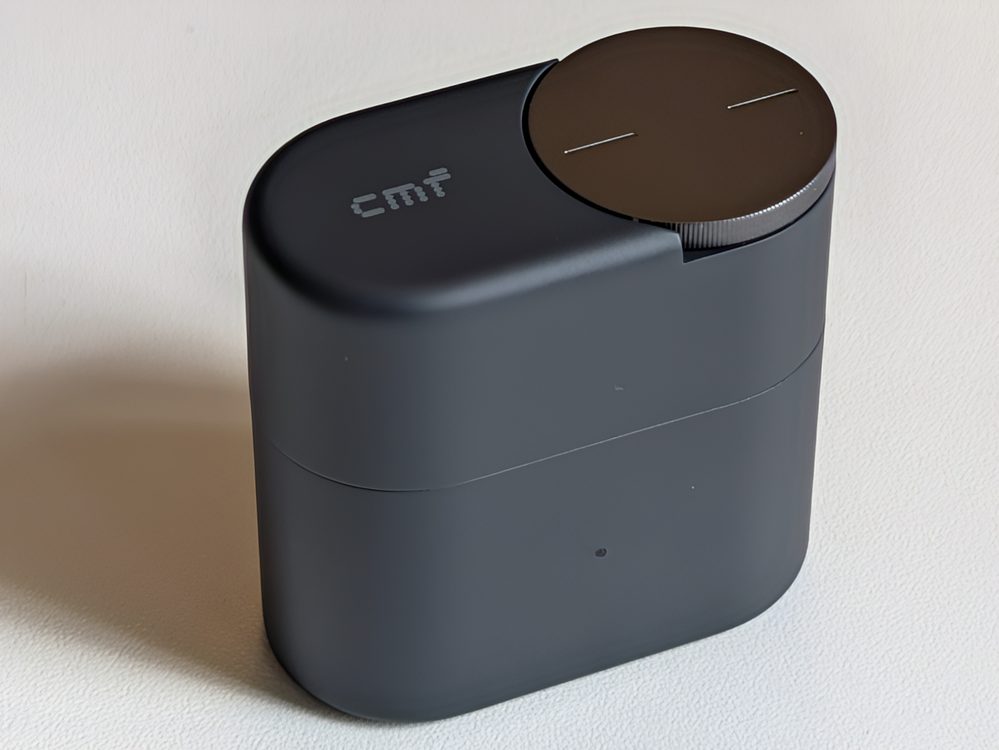
The case is rounded, matte, and stands upright on a table. It weighs 38.81 grams and is dominated by the large dial on the top. It looks good and feels solid.
A small detail worth mentioning is that the case has its own IP rating, IPX2. This only means it can withstand dripping water, but since most cases lack a rating entirely, it’s still more than you usually get.
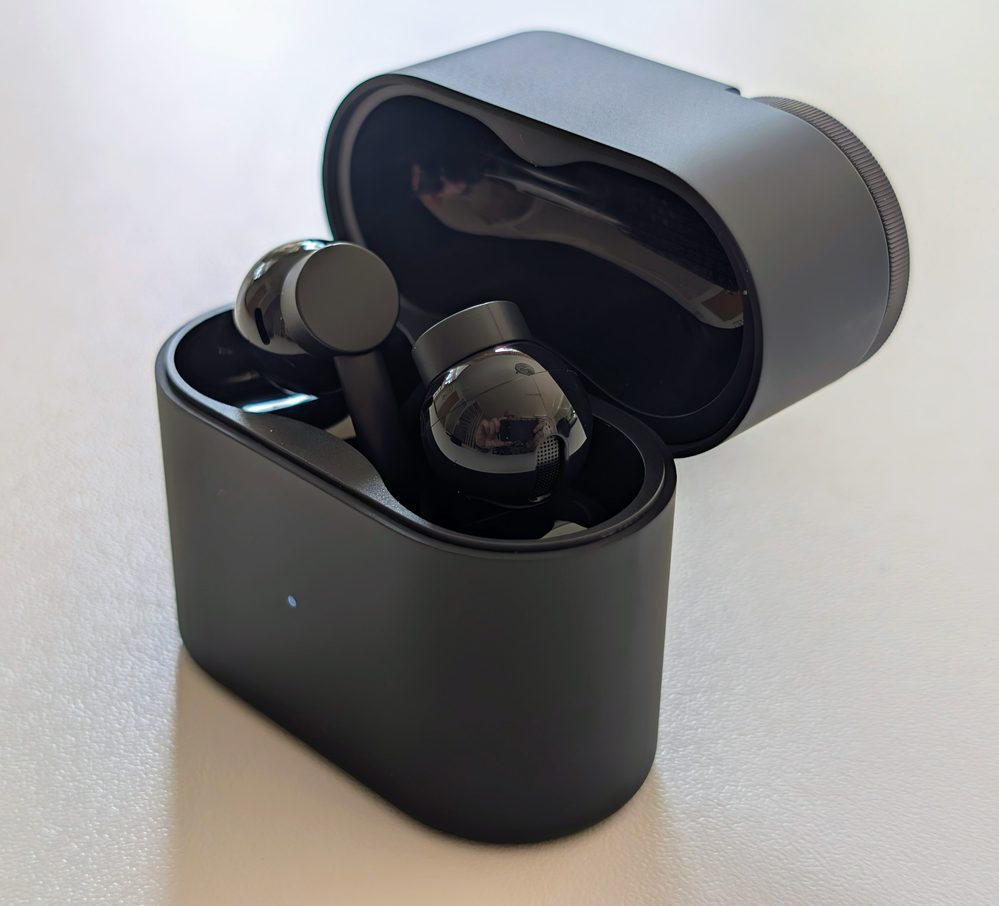
But here comes the first real objection, and it’s one that irritates every day. The buds cannot be placed just any way in the case; they have specific spots for right and left, and the markings are so small that in practice, I have to twist and turn them every time I put them back. If they are positioned incorrectly, they don’t make contact with the magnets and therefore won’t charge. This was solved a long time ago by competitors. On the SoundPEATS UU2, the case assigns channels automatically regardless of how you put them in, and the Huawei FreeClip 2 automatically detects which ear they are in. The fact that CMF doesn’t do something similar becomes an irritation every time you put them away.
Controls and Smart Dial
The controls on the buds, however, are very good. They feature real, physical buttons with a matte, textured surface that contrasts with the glossy chassis, allowing your finger to find the right spot without having to look. It also avoids the typical control issue of the open-ear form factor: touch surfaces being triggered accidentally when adjusting the headphones. Single press, double press, triple press, and long press are available, and everything can be remapped in the app.
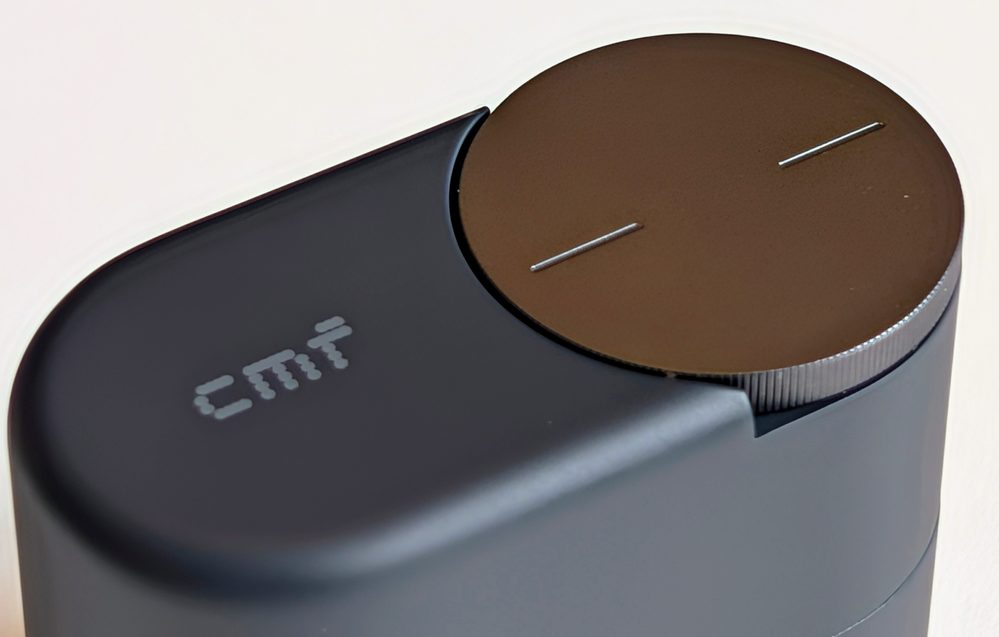
And then there’s the dial. It’s fun, and much of that comes down to the tactile feel. Both when turning and pressing, it responds with a distinct little click, and it’s one of those details you fiddle with unnecessarily just because it’s satisfying. You spin for volume, click to pause, double-click to skip tracks, and since the case is usually in your pocket anyway, it becomes a surprisingly natural way to control your music. It’s also large enough to find blindly. Because it’s on the case rather than the bud, you can adjust the volume without touching anything attached to your ear.
Then comes the strange part: all of that is turned off when you unbox the headphones. Smart Dial does nothing at all until you go into the app and activate the functions one by one. It’s the one thing these headphones can do that no one else can, and yet it’s hidden. Anyone who never downloads Nothing X will never know what the dial does. It should be enabled by default.
One more small catch: the volume adjustment lags slightly when spinning. It’s only by tenths of a second, but it’s enough that you sometimes spin one notch too far.
Sound Quality and the App
Unsurprisingly, the bass is weak. Getting weight out of a pair of headphones that don’t seal against the ear canal is the hardest task in this category, but that’s no excuse, because it is possible to do better. The Huawei FreeClip 2 faces the exact same physics and still delivers bass that is both heard and felt. Clip Pro does not. I play James Blake – Limit To Your Love, and about 55 seconds in, the pulsating, heavy sub-bass should kick in and fill the whole room. Here, it enters mildly, almost politely. Billie Eilish – Bad guy, which I otherwise use specifically because it should resonate in your chest, becomes flat in the same way. The punch simply isn’t there.
In the app, there is a Bass Enhance feature, a two-step boost, and it’s set to level 2 right out of the box. That’s where it should stay. I tried turning it down, and it’s not a good idea: without the boost, the sound becomes shrill and harsh, and the balance tips entirely toward the treble. Level 2 isn’t an “extra” mode for those wanting extra punch; it’s the setting the headphones need just to sound reasonable.
Higher up the register, it’s more enjoyable. From the midrange up, Clip Pro plays openly and clearly. Vocals and speech are front and center, and cymbals get some air. The bright tuning ensures that music remains audible even when there is surrounding noise.
And the surroundings remain present. That’s the whole reason this type of headphone exists, and here it works as intended. The ear canal is open, so the headphones themselves don’t block anything out: if I pause the music, it’s like not wearing any headphones at all. With music playing, it obviously depends on the volume. If you crank it up, it takes over, just like with any headphones. But at a normal level, I can hear traffic, bikes coming from behind, and people saying something to me, without needing to pause or take anything out of my ear.
The volume could also be higher. Indoors and on quiet streets, it’s plenty, but on the subway and along a busy road, I find myself wanting a few more decibels.
The app, on the other hand, is a pure delight. Nothing X is still one of the best headphone apps on the market, just as we noted in the review of Nothing Ear (3a). Everything is on a single screen: Spatial Audio, Sound Seal, Bass Enhance, Equalizer, Controls, Low Lag Mode, and Dual Connection, with Device Settings at the bottom. It’s fast, sleek, and logical.
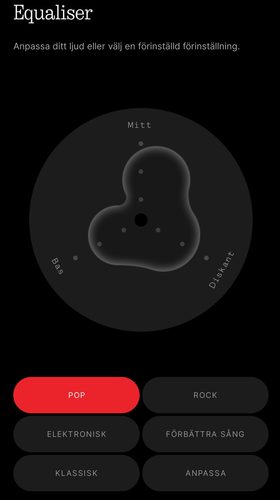
The equalizer is built as a circle where you drag a point between Bass, Mid, and Treble instead of fiddling with sliders, which is actually both more fun and more intuitive than a standard band-based EQ. There are five presets: Pop, Rock, Electronic, Enhance Vocals, and Classical, plus a Custom mode where you set the three bands yourself.
Spatial Audio has two modes: Fixed and Off. I left it on Off, because the Fixed mode definitely makes the sound worse.
Regarding codecs, there are LDAC, AAC, and SBC, and the headphones are Hi-Res Audio Wireless certified. If you want LDAC, you have to go in and select it yourself, just as you have to activate Dual Connection (multipoint) if you want to be connected to two devices simultaneously. It’s the same pattern as with Smart Dial: much of what is good remains turned off until you find it. On iPhone, you have to settle for AAC, as usual.
Anti-Leakage Mode
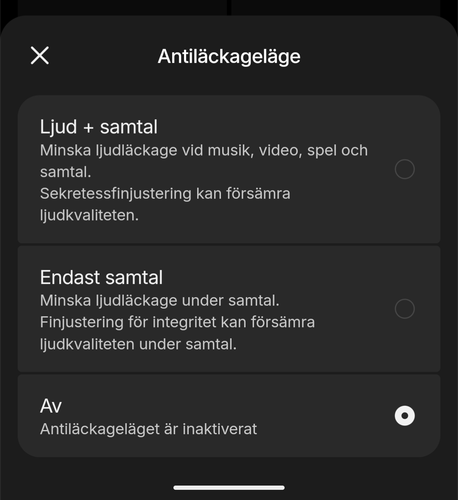
Anti-leakage mode, called Sound Seal in English, is CMF’s solution to the Achilles’ heel of open-ear headphones: the fact that people around you can hear what you’re listening to. There are three choices: Audio + Calls, Calls Only, and Off. It is set to Off from the factory.
The feature works, but it comes at a cost. If you select Audio + Calls, the sound becomes significantly worse—distinctly duller and as if played through a blanket. The difference is not subtle, and CMF actually states this themselves in the app, noting that fine-tuning can degrade sound quality. My advice is to use Calls Only and leave the music alone. Speech handles the degradation much better than music does, and it’s during calls that leakage matters most anyway, as that’s when bystanders could hear what is actually being said.
Calls
There are four microphones, two per ear, with a dedicated wind mic and a separate chip that extracts the voice before transmission. In quiet environments, it sounds very good—clear and natural. In noisier situations, the voice becomes duller as the algorithm struggles to separate it from the background, and wind remains the hardest challenge. It is perfectly acceptable for calls on the go, but nowhere near what the best call-focused headphones can achieve.
Battery Life and Charging
The battery life is fully acceptable, and in one respect, it’s better than that. CMF promises 10 hours in the buds and 32.5 hours total with the case. I measured just under nine hours with LDAC turned on and medium volume, which is strong. The promised ten hours likely apply to AAC, so high-resolution audio costs almost nothing here. Compare this to the SoundPEATS UU2 and EarFun Clip 2, where the playtime is effectively halved to around six hours as soon as LDAC is switched on. This is a real difference for anyone who wants both good sound and a full day of playtime.
The total battery life with the case, however, is the lowest in this group. EarFun Clip 2 gives 40 hours and Huawei FreeClip 2 gives 38, and both also charge wirelessly, which Clip Pro does not. It’s not a catastrophe, but you shouldn’t buy these thinking they are the most enduring in their class.
On the other hand, fast charging is the best in the group. Ten minutes in the case provides four hours of playback, whereas both EarFun and SoundPEATS provide two.
There is also a Long Battery Life Mode that pushes the total to 36 hours, but then Bass Enhance, spatial audio, and the equalizer are turned off. Since Bass Enhance is what holds the soundscape together, this is a mode I would practically never want to use.
Connection
Bluetooth 5.4 with multipoint, Google Fast Pair, and Microsoft Swift Pair. Switching between phone and computer works smoothly once you have turned on Dual Connection in the app, and I have only had occasional short dropouts in public transport. Low Lag Mode cuts some of the delay for movies and games, but it’s not a dramatic difference.
Conclusion
CMF Clip Pro does two things really well. They fit so comfortably that you forget you’re wearing them, and they have the best controls in their class, both the physical buttons on the buds and the dial on the case. Add to that an app that is in a class of its own and a battery life that lasts all day, and there is a lot to like here.
Then there’s the bass. It’s weak even for open-ear headphones, and Bass Enhance is already at its maximum, so there’s nothing more to be gained. The Anti-leakage mode makes the sound noticeably worse as soon as you use it for music. Putting the buds back in the case is unnecessarily fiddly when competitors solved the same issue a long time ago. And the fact that Smart Dial, the single most fun feature on the entire product, is disabled by default is incomprehensible. The same applies to LDAC and multipoint. CMF has built in a lot of good features and then hidden them away.
Then there’s the price. The recommended price is 990 SEK, with pre-orders from September 1 and deliveries starting September 7. That is roughly what the EarFun Clip 2 and SoundPEATS UU2 cost, making the choice a question of what you are looking for. If you want the most fun and accessible controls and the best app, Clip Pro is the obvious choice in its class. If you want the most sound for your money, there are other options, and if you want the best open sound overall, you’ll have to pay three times as much for the Huawei FreeClip 2.
CMF by Nothing sent review units for this test. Senders of material have no editorial influence on our tests; we always write independently with our readers and consumers in focus.
How we rate products at SensesReview Highlights: Q&A
How comfortable are these open-ear headphones for all-day wear?
CMF Clip Pro uses a three-part design with a flexible titanium wire bridge that fits securely without soreness, even when wearing glasses. With an IP54 rating, they stay in place during head movement and easily handle sweat or rain.
What is the battery life of the buds and charging case?
The buds last just under nine hours on medium volume with LDAC enabled, or up to 10 hours on standard playback, delivering 32.5 hours total with the case. A ten-minute fast charge in the case provides four hours of playtime, but wireless charging is not supported.
How does the Smart Dial on the case work?
The rotating dial on the case lets you spin to adjust volume or click to pause and skip tracks directly from your pocket. However, this functionality is turned off by default and must be manually enabled in the Nothing X app.
How good is the sound quality and bass?
Midrange and treble frequencies are clear and open, making vocals distinct. Bass response is weak even with the built-in Bass Enhance feature at maximum, and maximum volume can feel lacking in noisy environments like subways.
Does the anti-leakage mode affect music quality?
Activating the Sound Seal anti-leakage mode for music makes audio sound distinctly duller. It is best used on the Calls Only setting to prevent bystanders from hearing voice conversations without degrading music playback.